
Key Notes
- Luminar’s Fall Update launched on October 28 with refreshed Enhance and Atmosphere tools, Smart Compositions and an expanded conversational AI Assistant.
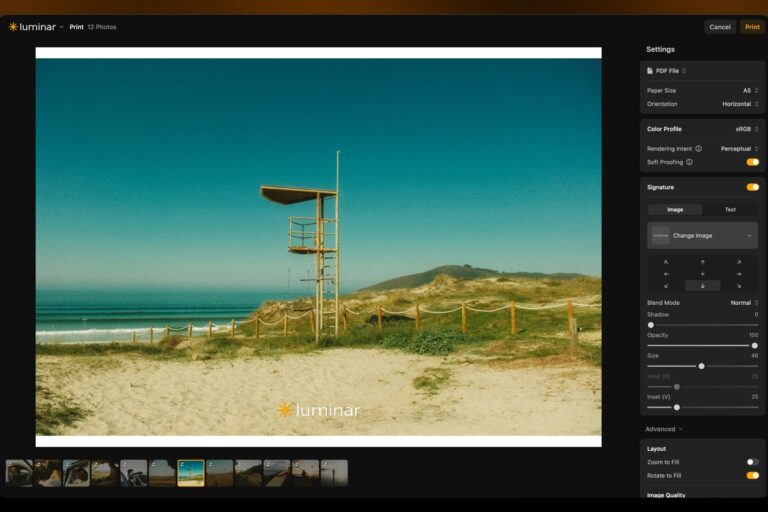
- The desktop release adds ICC color-profile support, soft proofing, signatures and print-ready exports, alongside options for ordering finished prints.
- Access depends on the platform and license, with Prime retaining some editing tools after membership ends while AI Assistant and generative features require an active paid period.
Skylum is updating Luminar around a familiar frustration with AI photo editing: an automatic improvement can make a picture look less like the photograph its author intended. The Fall Update refreshes Enhance, Atmosphere and cropping, expands the AI Assistant and adds a printing workflow, with the company emphasizing adjustments that respond to the original scene.
The update became available on October 28, with the desktop release arriving as version 1.29.0. Skylum’s announcement describes a broader rollout across desktop, web and mobile. The feature details in its desktop changelog cover everything from suggested compositions to color-managed printing; individual capabilities and access still depend on the platform and license.
The company calls its approach Scene-Aware Editing: tools analyze characteristics such as lighting, depth, subjects and faces before making adjustments. Skylum cites its own photographer survey, in which 73% of respondents prioritized a natural appearance over technical perfection and 76% had reduced or rejected an AI edit because it looked inauthentic.
AI Adjustments That Start With the Photograph
Enhance has been rebuilt to account for the image it is processing, including exposure, color casts, sky conditions and the risk of halos or blown highlights. Skylum says the revised tool is designed to protect skin tones and avoid excessive saturation. The aim is a more restrained starting point for an edit, while the photographer still decides how far to push the result.
Atmosphere takes a different route to the same goal. Its fog is now modeled as a three-dimensional volume within the scene, using depth and lighting information rather than applying a uniform-looking overlay. According to Skylum, the effect can collect near the ground, change with height and respond to sunlight, street lamps and headlights.
That makes the effect responsive to a photograph, but it remains a creative alteration. Adding convincing fog does not make it part of the original capture. The useful question for a photographer is whether the controls produce the intended mood without making the edit distracting, particularly around faces, boundaries and light sources.
Crop Suggestions and a Conversation About the Edit
Crop gains Smart Compositions, which examines the subject, faces, gaze direction and visual balance before proposing alternative frames. The desktop changelog lists up to 12 suggestions based on principles such as the rule of thirds, golden ratio and golden spiral. It also shows the composition grid behind a suggestion and adds automatic horizon straightening.
The expanded AI Assistant lets users describe a desired result, ask for feedback or get an explanation of how to use a tool. Skylum says it can make edits and suggest next steps, giving photographers another way to approach the same controls. A useful assistant would help someone understand a choice as well as apply it, especially when several different crops or tonal treatments could work.
Conversational editing is becoming common across creative software. Adobe’s ChatGPT integrations already bring image adjustments into a chat interface, while our coverage of ChatGPT Images 2.5 examined tighter control over repeated revisions. Luminar’s update places that interaction inside a photography workflow that continues through export and printing.
The Finished Image Gets a Print Workflow
The desktop release adds a dedicated printing mode with ICC color-profile support and soft proofing, allowing users to preview how a photograph may appear on paper. They can add a signature and save a print-ready JPEG or PDF. Luminar also lists ordering options for lab-produced prints, framed photographs, canvas and metal, extending the workflow beyond a file saved to a computer.
Export has its own full-screen preview, text or image watermark options and resizing by long edge, short edge or dimensions. These are practical additions for someone preparing the same photograph for a screen and a physical print. The preview can help reveal an unwanted crop or an output-setting mistake before the image leaves the editor.
Upgrade access deserves attention alongside the features. Skylum’s Prime FAQ says Prime is an add-on for existing Luminar license holders, rather than a license to the app itself. It distinguishes tools retained after membership ends from AI Assistant and generative features that remain available only through the paid period. Active Luminar Pro subscribers generally do not need a separate Prime subscription for the included upgrades.
Skylum’s pitch is that the photographer remains in charge of the finished image. For existing users, the meaningful test will be the editing process itself: whether suggestions save time, remain easy to change and leave a photograph that still feels like their own work.
Disclaimer: AIstify is an independent media brand owned and operated by NuvexMedia LLC, publishing news, research, and insights on artificial intelligence, emerging technologies, automation, and related industries. NuvexMedia LLC invests in and collaborates with companies across the AI, technology, software, and digital innovation sectors. These relationships do not influence AIstify’s editorial coverage, and the publication maintains full editorial independence to provide accurate, timely, and objective information. © 2026 NuvexMedia LLC. All rights reserved. This content is for informational purposes only and should not be considered legal, tax, investment, financial, or other professional advice.