Key Notes
- ChatGPT can combine text with interactive diagrams, charts and small tools.
- Intelligent UI began rolling out on October 7, with Free and Go expansion from October 8.
- The feature works with supported GPT-6 reasoning levels but excludes Pro reasoning.
ChatGPT can now answer with interactive diagrams, maps, charts and small tools that users operate inside a conversation. OpenAI calls the feature Intelligent UI, introduced with its October 7 GPT-6 update. The rollout began with paid plans and expanded toward Free and Go users from October 8.
The change gives an answer controls as well as words. Someone exploring a mechanism can inspect its parts, while someone comparing scenarios can change an input without asking the chatbot to write the entire explanation again. ChatGPT chooses a format according to the question and can still return a straightforward text response.
From Bicycle Diagrams to Trip Maps
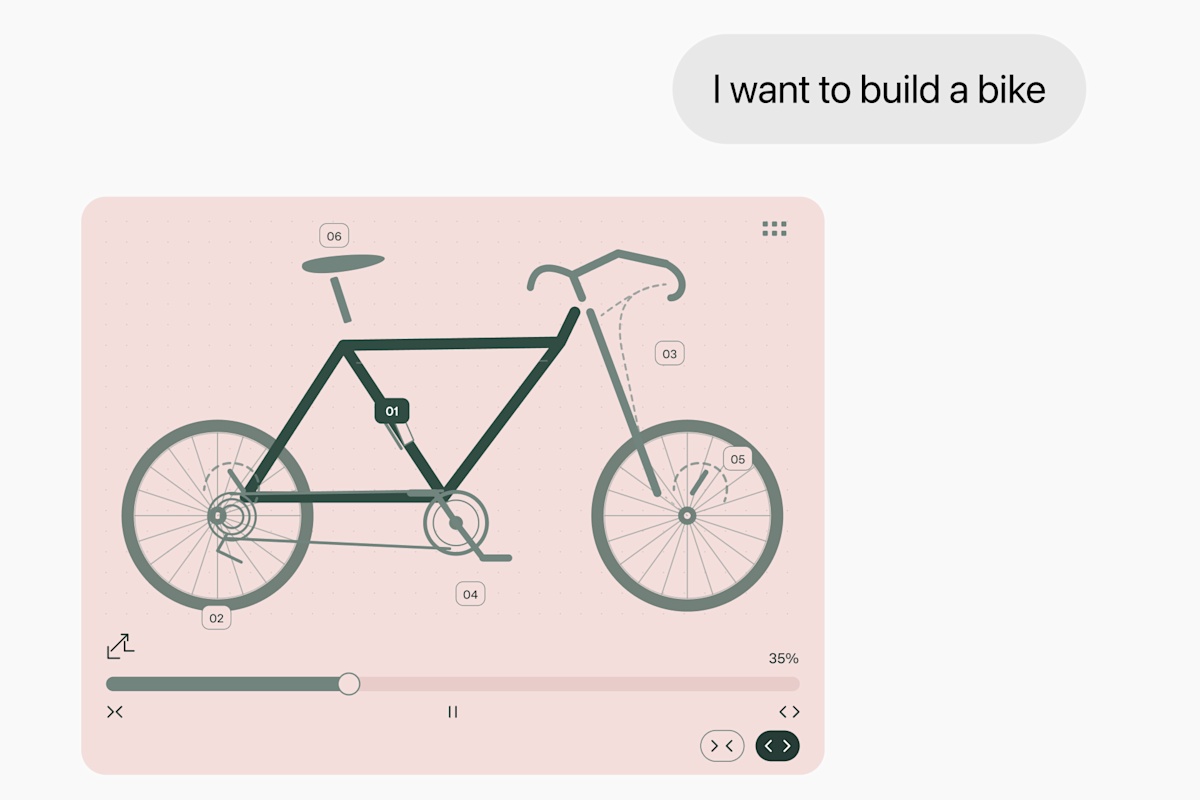
OpenAI’s announcement demonstrates a seven-speed bicycle with controls for its frame, wheels, drivetrain, brakes and cockpit. Selecting a system focuses the explanation on that part of the bike. The example is an interactive diagram, rather than a promise that every explanation will produce a detailed three-dimensional simulation.
Other demonstrations apply the same approach to planning. A road trip can be organized around a map, while a cooking plan can include adjustable quantities and a checklist. These are useful situations for an interface because the answer contains relationships that are harder to follow in a long sequence of paragraphs.
Small Tools Built for the Question
The feature also lets users request a tool directly. OpenAI shows a bill splitter, a retirement-savings calculator and a retro game. A user can ask for a specific experience rather than wait for ChatGPT to decide that one is appropriate.
A useful request describes both the job and the controls: for example, a calculator with adjustable inputs, a comparison with selectable options or a game with clear rules. For a mortgage example, the request could specify loan amount, interest rate and term, then ask the tool to show its calculation. That is an example prompt, not one of the company’s published launch demonstrations.
The quality of the result still depends on the assumptions underneath it. A polished calculator can omit an expense, and a neat chart can use incomplete data. Showing the inputs and explaining what each result includes makes the tool easier to check; the visual presentation alone does not establish that the answer is correct.
Interfaces Arrive as the Answer Is Written
OpenAI says Intelligent UI uses a library of native components and a compiler that processes the interface while the model generates it. This allows parts of the response to appear progressively. GPT-6 can also begin answering while continuing to think, adding findings as it goes.
The company reports that GPT-6 Instant begins answering questions requiring web search 44% sooner, on average, than GPT-5.6 Instant. That is a claim about the start of an answer, rather than a guarantee that every complete task finishes 44% faster. For users, the practical benefit is being able to begin reading or exploring before the whole response is ready.
Which ChatGPT Users Can Try It?
OpenAI’s release notes place the initial global rollout on October 7 for Plus, Pro, Business and Enterprise, with Free and Go following from October 8. The release applies to the Chat tab. Enterprise access depends on administrator settings, and a rollout date does not mean every account receives the feature simultaneously.
The usage guidance says Intelligent UI works with GPT-6 from Instant through Extra High reasoning, where those options are available. Pro reasoning uses Astra and does not support the feature. There is no separate Intelligent UI quota; existing model and plan allowances apply. On the web, turning off Layout and visuals in Settings reduces visual elements, although it does not guarantee a completely text-only experience.
This update also has a different role from OpenAI’s Dots agents, which take on ongoing assignments, or the GPT-6.1 Sol launch for professional and coding work. Intelligent UI concerns how an answer is presented and used in Chat. Its strongest everyday applications may be the small jobs where adjusting a few controls is more convenient than opening another application.
Edited by Samantha Reed.
Disclaimer: AIstify is an independent media brand owned and operated by NuvexMedia LLC, publishing news, research, and insights on artificial intelligence, emerging technologies, automation, and related industries. NuvexMedia LLC invests in and collaborates with companies across the AI, technology, software, and digital innovation sectors. These relationships do not influence AIstify’s editorial coverage, and the publication maintains full editorial independence to provide accurate, timely, and objective information. © 2026 NuvexMedia LLC. All rights reserved. This content is for informational purposes only and should not be considered legal, tax, investment, financial, or other professional advice.